







The best open-source A/B testing tools, compared

Also known as split testing or multivariate testing, A/B testing is the practice of splitting your audience to test variations of a product design, new feature, call to action, landing page – anything you can imagine, really.
There are dozens of A/B testing tools available, but what they offer varies widely. Many lean toward marketing use cases (i.e. testing website landing pages) and aren't useful for product feature testing, or only support specific platforms like Shopify or WordPress.
In this guide, we're looking at the best free and open-source A/B testing tools. Open-source tools are mainly built for developers, so we recommend marketers read our guide to the best alternatives to VWO.
What features do you need in an open-source A/B testing tool?
A good open-source A/B testing tool lets you experiment with changes to your product and measure their impact on real users without locking you into a proprietary platform. Most solid tools include:
- A/B and multivariate testing for comparing different variations
- Statistical analysis to determine when results are significant
- Feature flags for safely rolling out changes to specific user segments
- SDKs for your stack (JavaScript, Python, React, mobile, etc.)
- Self-hosting options so you keep full control of your data
More advanced tools go further with:
- Bayesian and Frequentist statistics so you can choose the approach that fits your team's workflow
- Multi-armed bandit experiments that automatically allocate traffic to the winning variation
- Holdout groups to measure the long-term cumulative impact of your experiments
- Visual editors for creating variations without code changes
- Warehouse-native architecture that connects directly to your existing data infrastructure
- Product analytics integration so you can analyze experiment results alongside broader user behavior
What are the best open source A/B testing tools? The short version
| Tool | License | Built-in results analysis | Free hosted plan |
|---|---|---|---|
| PostHog | MIT | Bayesian and frequentist | 1M feature flag requests a month |
| GrowthBook | MIT | Bayesian and frequentist | Up to 3 users, 1 project |
| Unleash | AGPLv3 | None; bring your own analytics | None (14-day trial) |
| Flagsmith | BSD 3-Clause | Bayesian, in beta | 50k requests a month, 1 team member |
PostHog is the pick if you want one tool for the whole experiment: feature flags to ship it, product analytics to measure it, and session replays to see why it won, with CUPED, sequential testing, and holdouts included on the free tier.
GrowthBook is best if you already have a data warehouse and want experiments analyzed on top of it.
Unleash is a feature flag tool first: it splits traffic, and you analyze the results elsewhere. Flagsmith is also flags-first, but added native experimentation with built-in statistics in 2026. All four can be self-hosted for free.
Here's how the most popular open-source A/B testing tools compare:
1. PostHog
- Who it's for: Product engineers and product teams who want experiments, feature flags, and analytics in one place.
- Who it isn't for: Marketers who want a visual editor first (we have no-code web experiments but they are limited), or teams that need multi-armed bandits.
- License: MIT (enterprise features are licensed separately)
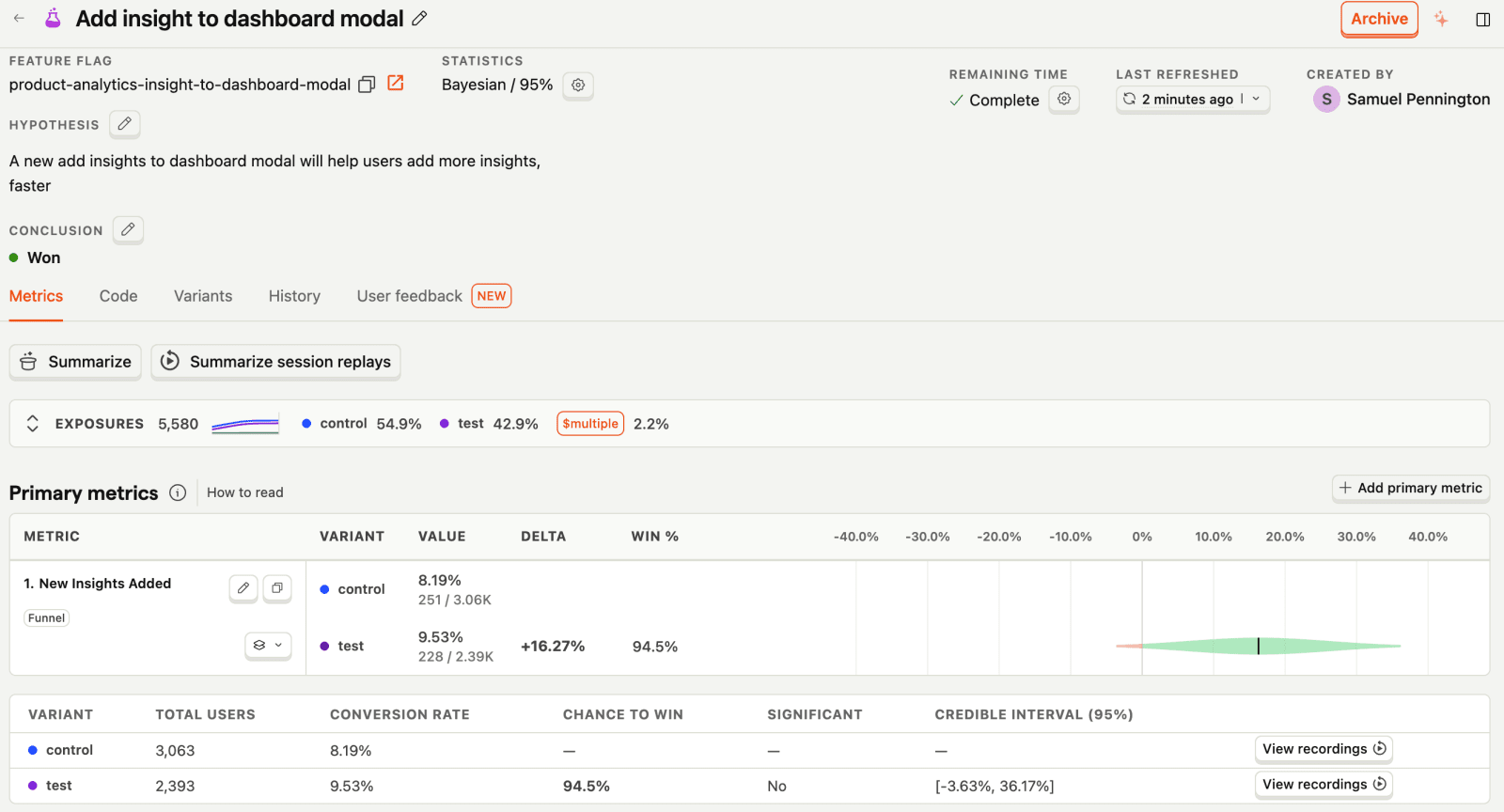
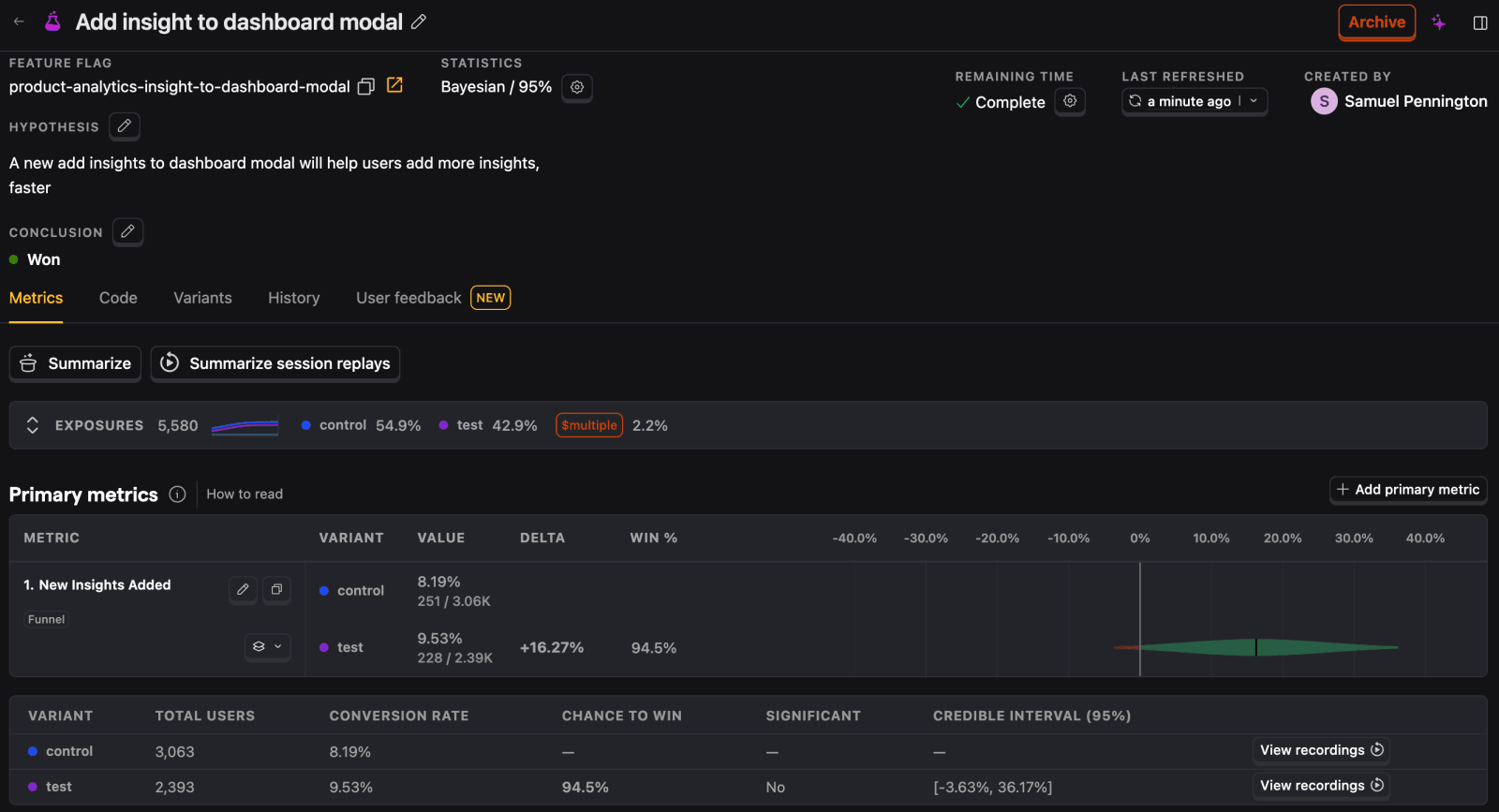
PostHog is your product's context layer. It combines experiments with product analytics, feature flags, session replay, error tracking, and a lot more, and a data warehouse and data pipelines connect it all to the business data you keep elsewhere. It's designed for product-minded engineers, growth teams, and product managers who need to move fast and iterate based on actionable insights.
PostHog's experimentation suite supports multivariate experiments, and targeting by geography, user cohorts, and person properties – all of which is built atop PostHog's multivariate feature flags. PostHog supports both Bayesian and Frequentist statistical approaches, so you can choose the method that fits your team's workflow.
You can also break results down by event or person properties, watch session replays of each variant, and see the errors users hit on each one.
What does PostHog Experiments include?
- Test types: A/B and multivariate tests with up to 20 variants, no-code web experiments, and no limit on how many experiments you run.
- Statistics: Bayesian and frequentist engines, with sequential testing and CUPED variance reduction.
- Metrics: Funnel, mean, ratio, and retention metrics, primary and secondary, plus shared metrics and metrics built on data warehouse tables.
- Targeting: Built on multivariate feature flags, so you can target by geography, cohort, or person property, and set aside holdout groups.
- Product context: A full product analytics suite for digging into results, and one of the best session replay tools for watching what each variant did.
- Agent access: The MCP server lets an AI agent create an experiment, launch it, read its results, and end it from your editor.
How much does PostHog cost?
Experiments are billed under feature flag requests, which are free up to 1 million requests per month.
After the free monthly allowance, you'll pay $0.0001/request, and requests cost progressively less the more you use. You can set billing limits to ensure you don't get surprise bills.
PostHog is open source under the MIT license, and experiments are part of the self-hosted deployment, though group experiments and multi-environment support are Cloud-only. Self-hosted PostHog is unsupported, so we recommend the free Cloud tier for most teams.
Bottom line
For teams looking for all the tools they need to experiment and improve their products, PostHog is a great choice. This is especially true for startups and scaleups thanks to its generous free tier.


Set up the flags for your first A/B test
The wizard adds example feature flags to your codebase. Turn any of them into an experiment.

2. GrowthBook
- Who it's for: Data and engineering teams that already have a data warehouse and want experiments analyzed on top of it.
- Who it isn't for: Teams that want CUPED, sequential testing, or bandits without paying (they're on Pro and Enterprise), or more than one project on the free plans.
- License: MIT (enterprise features are licensed separately)
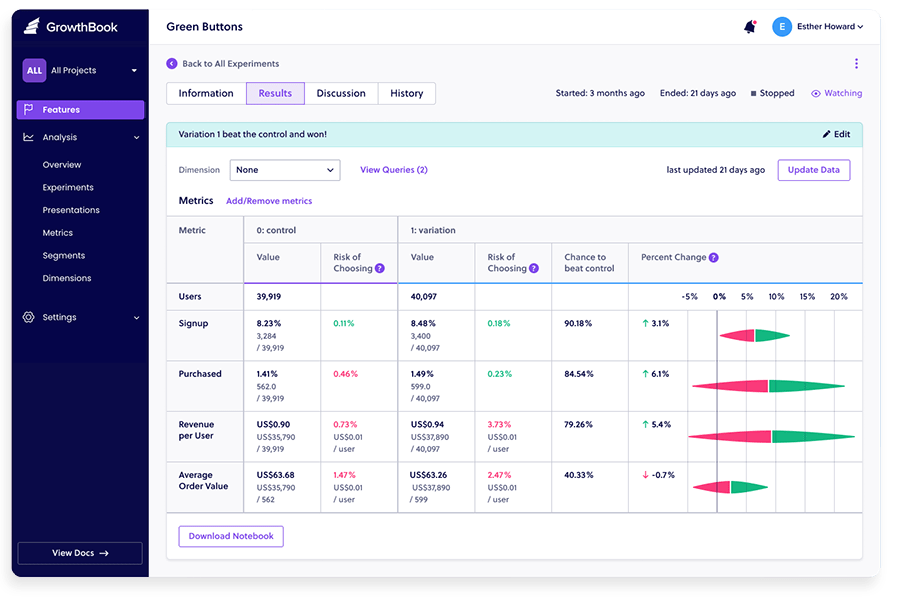
GrowthBook is an open-source platform for feature flags and A/B tests that helps teams to deploy code efficiently and analyze experiments. Built by engineers who wanted better insights on new releases, it is a modular solution that promotes feature flagging as an essential step in the development process. This means it can be used as a full experimentation platform, for feature flags only, or for experiment analysis only.
In 2026, GrowthBook made product analytics generally available and rebuilt its visual editor as an AI Visual Editor.
What does GrowthBook include?
- Warehouse-native analysis: Connects to BigQuery, Snowflake, Redshift, Databricks, ClickHouse, Postgres, and more with read-only access, so raw user data stays in your warehouse. A managed warehouse is available if you don't have one.
- Statistics: Bayesian and frequentist engines on every plan. CUPED variance reduction and sequential testing are on Pro and Enterprise.
- Experiment types: Feature flag experiments on every plan, plus an AI Visual Editor for no-code web tests, multi-armed bandits, and safe rollouts on Pro and Enterprise. Holdouts are Enterprise-only.
- Product analytics: Generally available since version 5.0 in July 2026, with the explorer on all plans.
- SDKs: Lightweight SDKs, including Swift, Kotlin, Flutter, and React Native for mobile.
- Agent access: An MCP server on all plans, hosted on Cloud or run locally when you self-host.
How much does GrowthBook cost?
GrowthBook open source is free to self-host with unlimited users and experiments, limited to one project. Their cloud Starter plan is free for up to 3 users and one project, also with unlimited experiments.
The Pro cloud plan costs $40 per seat per month for up to 30 users and adds advanced statistics (CUPED, sequential testing), the AI Visual Editor, and multi-arm bandits. If you self-host, those paid features need an Enterprise license.
Bottom line
GrowthBook is the best choice for data and engineering teams that already have a data warehouse and want to run experiments on top of their existing infrastructure. Its warehouse-native approach means your raw user data can stay in your own warehouse.
3. Unleash
- Who it's for: Engineering teams that mainly need feature flags and controlled rollouts, want to self-host, and already have an analytics tool for reading experiment results.
- Who it isn't for: Teams that want experiment results and statistics built in, a free hosted plan, or more than one project and two environments without paying.
- License: AGPLv3 since June 2026 (Apache 2.0 before)
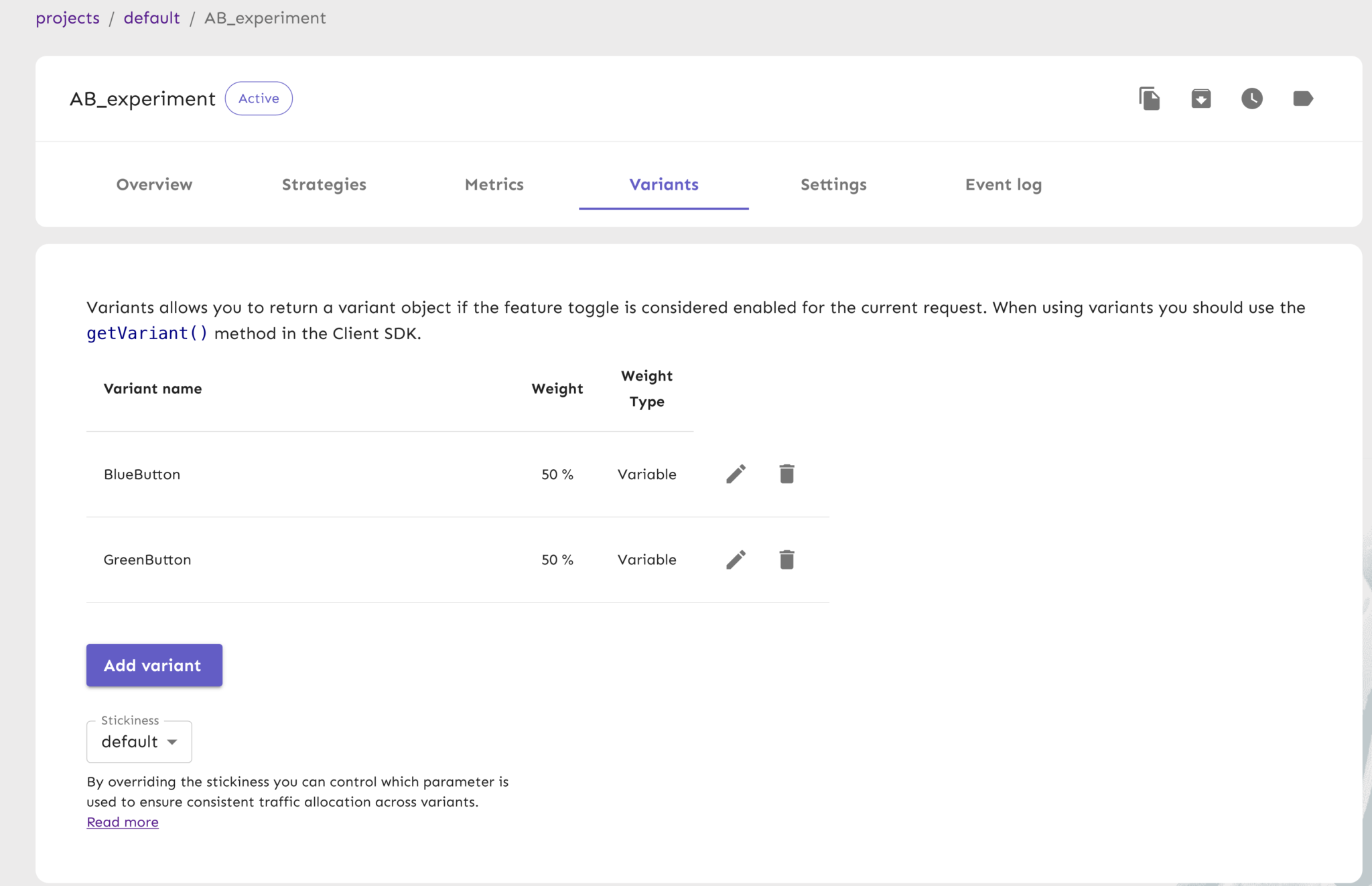
Unleash is a feature management platform that empowers engineering teams to implement A/B tests via feature toggles and offers accurate user targeting. It appeals to privacy-conscious organizations because flags can be evaluated inside your own infrastructure, so you don't have to share user data with third parties.
You can use Unleash to define the rules of your experiments, but the platform doesn't provide all the tools you need to manage A/B tests end-to-end. Instead, you'll need to connect your experiment with an analytics platform like PostHog, Google Analytics, or Mixpanel to visualize results.
Unleash moved its server from Apache 2.0 to AGPLv3 with version 8 in June 2026. Its SDKs keep their permissive licenses.
What does Unleash include?
- Flags and variants: Feature toggles with variants and user targeting, which you use to split traffic for an A/B test.
- No built-in analysis: Unleash's SDKs emit impression events that your code forwards to an analytics tool of your choice, and that's where you read results. Its impact metrics, an Enterprise feature, are for monitoring rollouts, not analyzing experiments.
- SDKs: 17 official SDKs, eight for backend and nine for frontend and mobile, plus OpenFeature providers, most of them in beta.
- Privacy: Backend SDKs evaluate flags locally, so user data stays inside your application.
- Integrations: Slack, Microsoft Teams, Datadog, and webhooks, with Jira Cloud on Enterprise.
- Agent access: An MCP server that can set up an experiment, though it doesn't analyze the results.
How much does Unleash cost?
Unleash's open source edition is free to self-host, with one project and two environments. There's no free hosted plan, only a 14-day trial. Enterprise is pay-as-you-go at $75 per seat per month, hosted by Unleash or self-hosted (with a 5-seat minimum when self-hosted). Custom Enterprise pricing is available for teams that want annual contracts and dedicated support.
Bottom line
Unleash is the best open-source option for teams that primarily need feature flag management and want to add basic A/B testing on top.
4. Flagsmith
- Who it's for: Engineering teams that want feature flags and remote config they can self-host, with experimentation in the same tool.
- Who it isn't for: Teams that need a mature experimentation suite today (its native experiments are in beta and Bayesian only), or more than one team member on the free cloud plan.
- License: BSD 3-Clause (enterprise features are licensed separately)
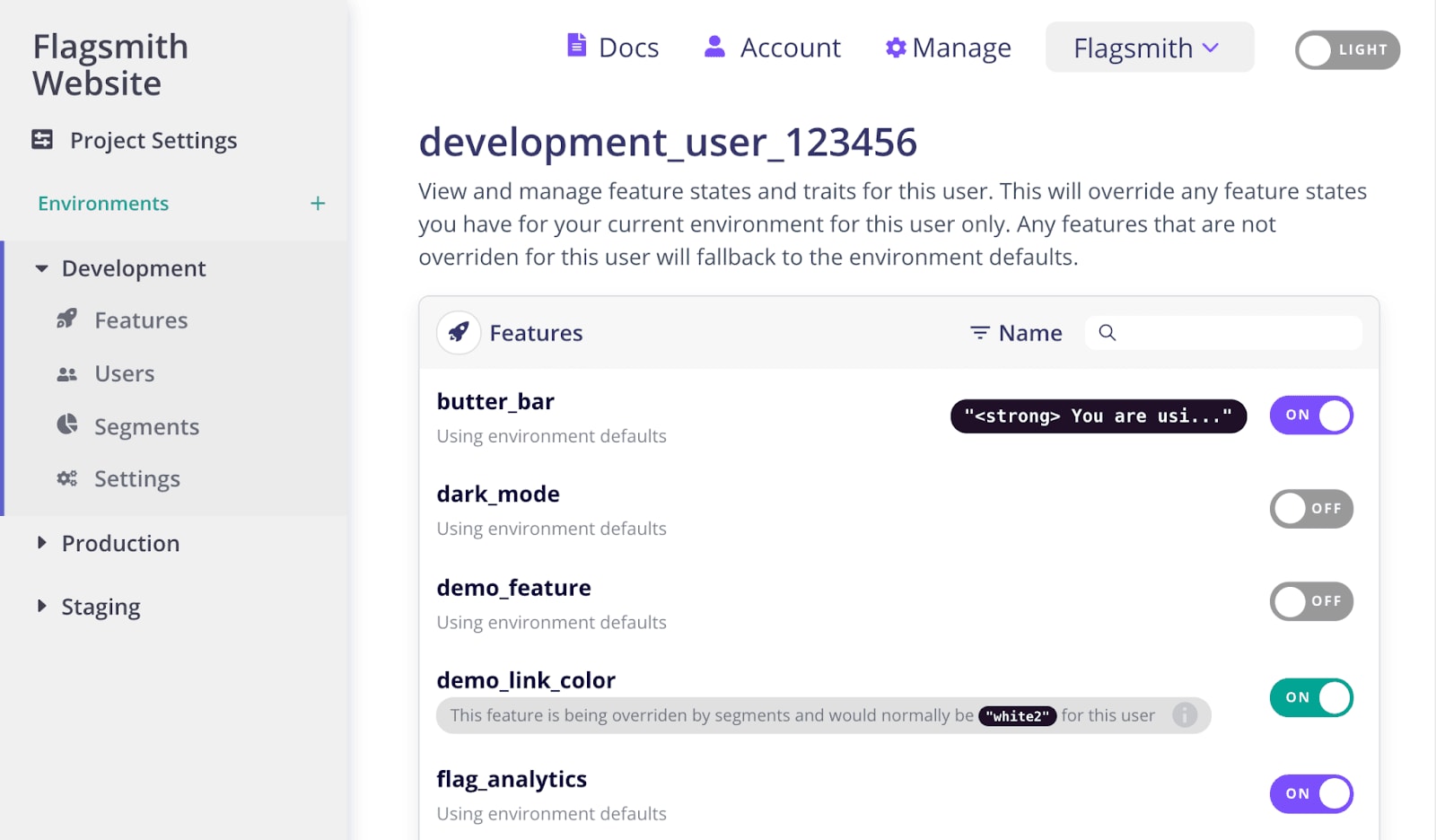
Flagsmith is an open-source feature flag and remote configuration service that lets you manage features across mobile, web and server-side applications.
Until 2026, A/B testing with Flagsmith meant using its multivariate flags as a bucketing engine and sending the data to a third-party analytics tool.
It now has native experimentation, in beta: multivariate flags serve the variants, events flow into a warehouse, and a built-in Bayesian statistics engine reports the results. It works in the open source build as well as on Flagsmith's cloud, though self-hosters need their own warehouse and event pipeline to run it in production. The older bring-your-own-analytics route is still supported.
What does Flagsmith include?
- Flags and remote config: Feature flags and typed remote config values across web, mobile, and server-side apps, with segment rules for targeting.
- Experimentation (beta): Multivariate flags serve the variants, and a built-in Bayesian engine reports lift, a 95% credible interval, win probability, and a sample ratio mismatch check. Events go to Flagsmith's managed warehouse on Cloud, or your own ClickHouse, Databricks, or PostgreSQL (on Cloud, connecting your own needs the Scale-Up plan or above).
- Integrations: Amplitude, Mixpanel, Segment, Heap, and RudderStack, if you'd rather analyze experiments in your own analytics tool.
- Deployment: Cloud, private cloud, or fully on-premises. The open source build is free to self-host with no API request limits.
- Agent access: An MCP server, hosted or self-hosted, and OpenFeature providers.
How much does Flagsmith cost?
Flagsmith is open source under a BSD 3-clause license and free to self-host. A supported Enterprise edition for on-premises or private cloud hosting is priced on request.
Their cloud free plan includes up to 50,000 requests per month for 1 project with 1 team member with unlimited flags, environments, and segments. The Start-Up cloud plan is $45 per month ($40 if billed yearly) for up to 1 million requests and 3 team members, and Scale-Up is $300 per month ($250 if billed yearly) for 5 million or more.
Bottom line
Flagsmith is the best fit for teams that want self-hosted feature flags and remote config first, with experiments in the same tool. Its built-in analysis is still in beta and Bayesian only, so if you need mature statistics today, PostHog or GrowthBook is the safer pick.
Other open source tools worth knowing
These didn't make the list, either because they're newer and less widely used or because they don't analyze results:
- Bucketeer: An Apache 2.0 feature flag and experimentation platform from CyberAgent. It has built-in Bayesian analysis with a sample ratio mismatch check, and you self-host it with Docker Compose or Kubernetes. No free hosted plan is documented.
- FeatBit: An MIT-licensed, open core feature flag platform with Bayesian A/B/n analysis and guardrail metrics. It's free to self-host with no seat limits, and its cloud has a free plan for up to 1,000 monthly active users.
- GO Feature Flag: A fully MIT-licensed flag tool built around OpenFeature. It can split traffic for an experiment and export the data, but it doesn't analyze results.
Which open-source A/B testing tool should you choose?
- Want experiments connected to the rest of your product data, from session replays to feature flags to errors, and manageable by your agents through the MCP? Go with PostHog.
- Already have a data warehouse and want to run experiments on top of your existing data? Choose GrowthBook.
- Primarily need feature flag management with basic A/B testing and a privacy-first architecture? Unleash is your best bet.
- Need open-source feature flags with remote configuration and on-premises hosting, plus native experiments in beta? Try Flagsmith.
Is PostHog right for you?
Here's the (short) sales pitch.
We're biased, obviously, but we think you'll love PostHog if:
- You value transparency (we're open source and open core)
- You want tools to ship, track, and analyze new features – like A/B testing, feature flags, and session replays
- You want your coding agent to create experiments and check their results through the MCP
- You want to try before you buy (we're self-serve with a generous free tier)
It's completely free to get started – no credit card required. Our setup wizard handles configuration in minutes, or you can check out our docs to do it yourself.
Start A/B testing with one command
The wizard installs PostHog, so your events and feature flags are ready for your first experiment.
Frequently asked questions
What does it mean for PostHog to be your product's context layer?
It means your experiments sit next to everything else you know about the user. Experiments, feature flags, product analytics, session replay, error tracking, and logs all write to the same place and share one model of users and sessions. For any variant, you can see what users did next, watch their sessions, and check whether it caused more errors.
The data warehouse and data pipelines extend it to the business data that lives elsewhere, like Stripe, HubSpot, and Postgres. So you can measure an experiment against revenue or churn, and an agent working from Slack, the CLI, or your editor via the MCP can answer questions about it without stitching tools together.
PostHog says it makes your product "self-driving" – what does that mean?
It means PostHog digs through your product data, finds what's worth fixing, and has agents do the work.
It starts with context. A full suite of developer tools – AI observability, product analytics, session replay, feature flags, experiments, error tracking, logs, and more – captures everything happening in your product, and a data warehouse unifies it into one source agents can read across.
From there, Scouts read across all of it and sort what's worth knowing from what's just noise. What clears the bar becomes a report in your inbox: an agent picks it up, roots out the cause, and opens a PR. You review and merge.
You can steer it from Slack, the web app, or your own editor via the MCP or CLI.
What is the best free A/B testing tool?
It depends on what you need.
PostHog is the best option for product teams that want experimentation alongside product analytics, session replay, and feature flags in one platform – its free tier includes 1 million feature flag requests per month.
GrowthBook is the best choice for teams that already have a data warehouse and want a dedicated, warehouse-native experimentation tool – it's free to self-host with unlimited users and experiments, though only one project. If you're looking for more options beyond open source, check out our guide to the best mobile app A/B testing tools.
Which open-source A/B testing tools have an MCP server?
All four on this list do, so a coding agent like Claude Code or Cursor can work with your experiments:
- PostHog: An agent can create an experiment, launch it, read its results, and end it through the MCP server.
- GrowthBook: An MCP server on all plans, hosted on Cloud or run locally when you self-host.
- Flagsmith: An MCP server that gives agents access to its management API, hosted or self-hosted.
- Unleash: An MCP server that can set up an experiment but doesn't analyze its results.
What's the difference between feature flags and A/B testing?
Feature flags let you toggle features on or off for specific users without deploying new code. A/B testing uses feature flags to randomly split users into groups (variants) and then measures which variant performs better against a goal metric.
In practice, most A/B testing tools on this list – PostHog, GrowthBook, Unleash, Flagsmith – are built on top of a feature flagging engine. The distinction matters because Unleash is primarily a feature flag tool that can be used for A/B testing, while PostHog and GrowthBook provide end-to-end experimentation with built-in statistical analysis. Flagsmith sits in between: it's a feature flag tool that added native experiment analysis, in beta, in 2026.
Is GrowthBook really free?
Yes, with caveats. GrowthBook's self-hosted open-source version (MIT license) is free with unlimited users, experiments, and feature flags, but only one project. The cloud-hosted Starter plan is free for up to 3 users and one project. If you need advanced features like CUPED variance reduction, the AI Visual Editor, or multi-arm bandits, you'll need the Pro plan at $40 per seat per month on Cloud, or an Enterprise license if you self-host.
Can you do A/B testing without code?
Some tools on this list offer visual editors that let you set up web experiments without writing code. GrowthBook includes an AI Visual Editor on its Pro plan, and PostHog has no-code web experiments for simple changes. For fully no-code A/B testing, you'll likely want a marketing-focused tool like VWO or Optimizely instead, though these are neither free nor open source.
You can also use a combination of an AI agent and MCP to help you do this.
Do I need a separate analytics tool with open-source A/B testing?
It depends on the tool.
- PostHog includes full product analytics alongside experimentation, so you don't need anything else.
- GrowthBook is warehouse-native: it analyzes experiments on your existing data warehouse, or on its managed warehouse if you use GrowthBook Cloud. If you self-host, you need your own warehouse and event pipeline.
- Unleash is primarily a feature flag tool – you'll need a separate analytics platform (like PostHog, Google Analytics, or Mixpanel) to analyze your experiment results.
- Flagsmith can now analyze experiments itself, in beta, using its managed warehouse or your own, or you can keep sending data to a separate analytics platform.
What's the difference between Bayesian and Frequentist A/B testing?
These are two statistical approaches for analyzing experiment results.
- Frequentist testing uses p-values and confidence intervals – you define a sample size upfront, run the test, and check if results are statistically significant at the end.
- Bayesian testing calculates the probability that one variant is better than another and updates continuously as data comes in, making it easier to interpret mid-experiment.
PostHog and GrowthBook support both approaches. Flagsmith's native experiments are Bayesian only, and Unleash doesn't include statistical analysis at all – you'll need to calculate significance yourself or use a separate tool.
Can I self-host an A/B testing tool?
Yes – that's one of the main advantages of open-source A/B testing tools. GrowthBook offers both cloud and self-hosted options, though its paid statistics features need an Enterprise license when you self-host. Unleash and Flagsmith can be self-hosted for free with their open-source editions.
PostHog can be self-hosted too, but the deployment is unsupported and we recommend Cloud.
Are older A/B testing frameworks like Wasabi, PlanOut, and Sixpack still maintained?
Mostly not. Intuit's Wasabi says it's no longer under active development, Facebook's PlanOut was archived in 2021, Sixpack hasn't had a commit since 2020, and Vanity was archived in 2024. The Split gem for Ruby is the exception and is still maintained.
They still turn up in lists of open-source A/B testing frameworks, but for a new project you're better off with one of the tools above.
Further reading
- The best mobile app A/B testing tools
- A software engineer's guide to A/B testing
- Common A/B testing mistakes
- The best open-source feature flag tools
- PostHog vs. GrowthBook

Subscribe to our newsletter
build mode
Read by 75,000+ founders and builders
We'll share your email with Substack
PostHog is your product's context layer. With a full suite of developer tools – AI observability, product analytics, session replay, feature flags, experiments, error tracking, logs, and more – PostHog ingests and stores all the data agents need to diagnose problems, uncover opportunities, and ship fixes. A data warehouse and CDP tie it all together, unifying that context into one source agents can read across. You can steer it all from Slack, the web app, the desktop (PostHog Desktop), or your own editor via the MCP.